The problem with portable scanners isn’t scanning anymore. It’s the software, the setup, and the quiet realization that your “travel-friendly” device takes up more bag space than you’d hoped. Most people discover what they hate about a wand scanner after buying it—not before.
For anyone traveling frequently, digitizing documents isn’t optional. Receipts pile up. Contracts get crumpled. Old photos from family visits need preserving before they fade further. The question isn’t whether to buy one. It’s which compromises you’re willing to live with.
After sorting through what’s available in 2026, the Epson WorkForce ES-50 stands out as the most practical everyday option for most travelers. It’s not flashy. It doesn’t try to do everything. But it works reliably, which matters more than any feature list.
That said, different trips demand different tools. Book scanners, duplex models, and self-contained wand scanners each serve specific use cases. The guide below covers the range from roughly $100 to $260, so there’s room to choose based on actual needs rather than marketing hype.
The Real Contenders
Let’s start with what actually matters in daily use: speed that doesn’t feel slow, reliable software that doesn’t crash mid-scan, and a design that doesn’t make you resent carrying it.
Epson WorkForce ES-50 – The One Most People Should Buy
At around $120, the ES-50 is the fastest single-sheet scanner in its class. A single page takes about 5.5 seconds. That’s quick enough that you won’t hesitate before scanning something small.
The real advantage here is that it’s USB-powered. No batteries to charge. No adapters to lose. Plug it into a laptop or even a power bank and it just works. The weight is roughly half a pound—light enough that you might forget it’s in your bag until you need it.
What’s less obvious from the specs: the included software (Epson ScanSmart) is genuinely usable. Not flashy. Not bloated. It handles OCR, file naming, and basic organization without forcing you through confusing menus.
One thing worth noting—this is single-sided only. If you frequently need to scan both sides of a document, the Brother DS-740D (double the price) becomes more appealing. But for most receipts, contracts, and single-page documents, single-sided scanning is completely fine.
Brother DS-640 – Faster Than You’d Expect From Something This Small
Brother’s DS-640 is slightly longer than the Epson (just under a foot) but still fits comfortably in a laptop bag. The headline feature: 16 pages per minute, color and black-and-white at the same speed. That’s noticeably faster than the ES-50.
For travelers who scan batches of documents rather than individual sheets, that speed difference adds up quickly. Ten pages in under 40 seconds versus nearly a minute.
The trade-off is a slightly less polished software experience. Brother’s scanning utility works fine, but the OCR accuracy isn’t quite as consistent as Epson’s. Nothing deal-breaking, but noticeable if you’re scanning dense text regularly.
Also worth mentioning: the DS-640 is single-sided. The duplex version (DS-740D) exists at $150 but the single-sided model hits a better balance of price and performance for most people.
Plustek S410 Plus – Budget Option That Doesn’t Feel Cheap
At $99, the S410 Plus is the cheapest reliable option here. It’s button-free—insert a document and it scans automatically. No software buttons to click. That sounds trivial, but after the first few dozen scans, it becomes genuinely convenient.
Plustek has been making document scanners for long enough that their OCR software (included) is decent. Not great. But decent. For receipts and simple text documents, it works fine. For complex layouts or handwritten notes, expect some errors.
The build quality is acceptable at this price point. The plastic feels slightly less premium than the Brother or Epson models, but it’s not flimsy. It’ll survive being tossed into a carry-on.
One weird limitation: it’s bus-powered via USB, which is great for portability, but some older laptops might not supply enough power through a single port. If your laptop is more than a few years old, this could be an issue.
VuPoint Solutions Magic Wand – For When You Need to Scan Against Walls
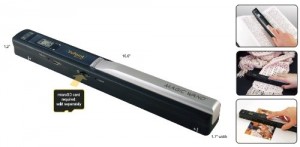
The VuPoint Magic Wand (with auto-feed dock) is a completely different approach. Instead of feeding paper through a slot, you glide the wand over documents. This matters for: bound books, magazine articles you don’t want to tear out, or fragile documents that can’t go through a feeder.
The auto-feed dock is the real innovation here—it turns the wand into a sheet-fed scanner when needed. Two modes in one device.
But the wand scanning itself requires patience. You need to move it steadily. Too fast and you’ll get blurry results. Too slow and the image might warp. It takes practice. User feedback suggests most people eventually get the hang of it, but the first few scans can be frustrating.
The LCD preview screen sounds useful. In practice, it’s small and low-resolution. Good enough to confirm you captured something. Not good enough for quality assessment.
Memory card storage (microSD up to 32GB) means you can scan without a computer attached. This is genuinely useful for fieldwork or travel without a laptop.
The biggest downside: build quality feels dated. The plastic housing, the buttons, the overall design—it looks like something from 2015. It works, but it doesn’t feel modern.
Brother DS-740D – When You Need Both Sides
Duplex scanning sounds like a luxury until you have a stack of double-sided contracts. Then it becomes essential.
The DS-740D scans both sides in a single pass at the same 16 ppm speed as its single-sided sibling. That’s genuinely fast. For anyone dealing with legal documents, agreements, or printed reports with content on both sides, this saves enormous time.
The unit is slightly heavier and bulkier than the ES-50 but still fits in a standard bag pocket. It’s been consistently reliable based on long-term user feedback—Brother’s scanner line is known for longevity.
The software situation is the same as the DS-640: functional but not beautiful. For batch scanning workflows, it gets the job done.
The $150 price tag feels fair for what you get. If duplex is a requirement, this is the best option in this range.
The Book Scanning Options
CZUR Shine Ultra – A Different Kind of Portable
This isn’t a wand scanner in the traditional sense. It’s a document camera with a stand—you place documents or books underneath, and a camera captures the image from above. The Shine Ultra can handle up to A3 size, which matters for larger documents or magazine spreads.
For travelers who need to digitize book pages without damaging spines, this is the best approach. The scanning speed is fast (under 1 second per page according to manufacturer specs) and the software includes automatic flattening.
But there’s a significant limitation: it requires a laptop or desktop computer. No standalone operation. And it’s not compatible with Android or iOS devices. For some travelers, that’s fine. For others who work primarily from a tablet, it’s a dealbreaker.
The foldable design makes it packable, but it’s still larger than a sheet-fed scanner. Not something you’d slip into a jacket pocket.
At $199, it occupies an odd middle ground—too expensive for casual scanning, not feature-rich enough for dedicated office use. It’s best suited for researchers, students, or professionals who frequently need to digitize bound materials.
Quick Comparison
| Product | Price | Key Strength | Main Drawback | Best Fit | Rating | Link |
|---|---|---|---|---|---|---|
| Epson ES-50 | ~$120 | Fastest single-sided, reliable software | No duplex | Everyday travel scanning | 4.3 | Link |
| Brother DS-640 | ~$130 | 16ppm speed, compact | Slightly bulky | Batch scanning on the go | 4.3 | Link |
| Plustek S410 Plus | ~$99 | Auto-scan, affordable | Underpowered USB on old laptops | Budget-conscious travelers | 4.2 | Link |
| VuPoint Magic Wand | ~$130 | Bound book scanning, no computer needed | Learning curve for wand mode | Researchers, photographers | 4.3 | Link |
| Brother DS-740D | ~$150 | Duplex scan, fast | Higher price | Legal docs, double-sided printing | 4.3 | Link |
| CZUR Shine Ultra | ~$199 | A3 size, book flattening | No mobile support | Researchers, students | 4.4 | Link |
Buyer’s Guide for Portable Wand Scanners
Why Lid Design Matters More Than Insulation
Wait—that’s for mugs. For scanners, the equivalent is software reliability. A scanner with amazing hardware specs but buggy drivers is worse than an average scanner with excellent software. This is why the Epson ES-50 consistently gets recommended despite not having the fastest hardware. The software just works. No crashes. No format errors. No mysterious connection drops.
Speed: The Marketing vs. Reality Gap
Manufacturers advertise “up to 16 ppm” in ideal conditions. Real-world speeds are usually 20-30% slower when factoring in document alignment, software processing, and file saving. Budget for the slower number.
For travel scanning—where you might scan 5-10 pages at a time—speed differences between 5.5 seconds per page and 3.5 seconds per page are negligible. For batch scanning 50+ pages, the faster models become worthwhile.
The Duplex Decision
If you scan double-sided documents more than occasionally, pay extra for duplex. The time savings are significant. But if 90% of your scanning is single-sided receipts and forms, duplex is wasted money and bulk.
USB Power vs. Battery
USB-powered scanners (Epson, Plustek) are lighter and never run out of power mid-scan. Battery-powered scanners (VuPoint) can operate without a computer but add weight and require charging. For most travelers, USB power is the better trade-off.
Book Scanning: Specialized Tools Only
Regular sheet-fed scanners cannot handle books. If preserving book spines matters, you need either a wand scanner (VuPoint) or a document camera (CZUR). Neither is perfect, but both work.
FAQ
How quickly should my portable scanner scan?
For occasional use, 5-10 seconds per page is fine. For batch scanning, aim for under 5 seconds per page. Anything slower will feel frustrating.
Do I need duplex scanning?
Only if you regularly scan double-sided documents. Single-sided is fine for receipts, forms, and most standard paperwork.
Can I scan books without damaging the spine?
Yes, but only with wand scanners or document camera scanners. Sheet-fed scanners will damage bound materials.
What’s the most important feature for travel?
Weight and size matter most. The Epson ES-50 is the lightest option at around half a pound. The VuPoint wand is bulkier but doesn’t require a computer.
Is OCR software worth paying for?
Yes, but the included software varies. Epson’s ScanSmart is better than Brother’s utility. Plustek’s is adequate for simple text. For complex layouts, consider third-party software.
Can I scan directly to cloud storage?
Most models require computer software to manage file transfer. The VuPoint wand saves to SD card, which then needs manual transfer. No portable scanner in this range directly uploads to cloud.
Final Thought
The scanner you actually use regularly isn’t necessarily the one with the best specs. It’s the one that integrates into your workflow without friction. For most travelers, that means the Epson ES-50—lightweight, fast enough, reliable software, and no charging hassle.
The Plustek S410 Plus is the smart budget pick if you’re willing to accept slightly better software than the price suggests. For duplex needs, the Brother DS-740D earns its extra cost.
And if you need to scan books without damaging them, accept that you’re buying a specialized tool. The VuPoint wand does the job but demands patience.
A portable scanner doesn’t have to be perfect. It just has to stop being one more thing you avoid using.